Introduction
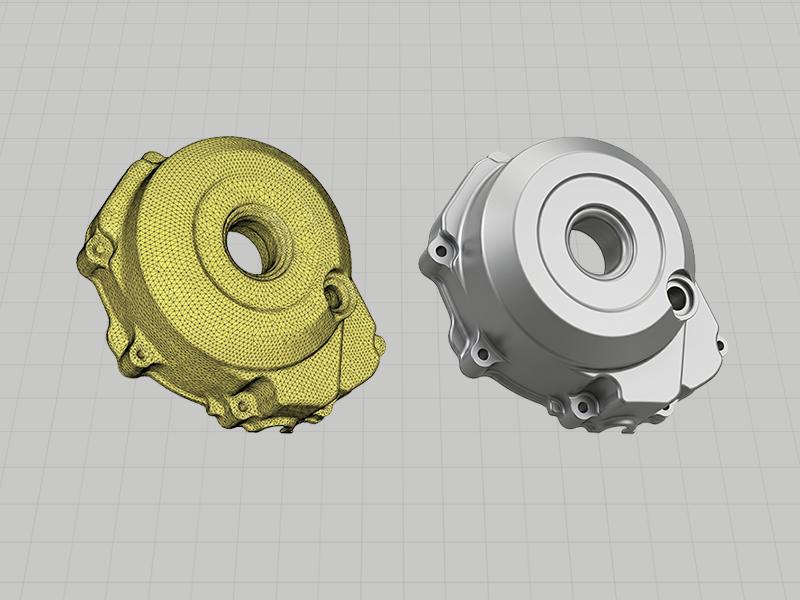
A manufacturer sends an old mechanical component for 3D scanning and requests an STL file for manufacturing. Is that enough?
It depends on the application. STL can support 3D printing, visualization, and mesh-based inspection. However, it does not inherently contain editable CAD features, nominal dimensions, or manufacturing tolerances.
The key distinction is simple: Scan-to-STL captures geometry, while reverse engineering reconstructs engineering intent.
Understanding this difference helps manufacturers choose the right workflow for replacement parts, product redesign, tooling, and CNC machining.
1. What Is an STL File?
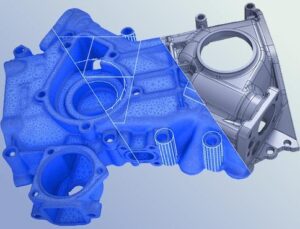
STL represents a 3D object’s surface using triangular facets. It is widely used in additive manufacturing and other mesh-based applications.
However, STL does not inherently preserve a parametric feature tree, editable sketches, design dimensions, or GD&T requirements.
For example, a scanned housing may contain a circular opening represented by thousands of triangles. The mesh captures its surface, but it does not automatically define the opening’s nominal diameter, axis, or tolerance.
STL is suitable for:
- 3D printing and prototyping.
- Digital visualization and geometric archiving.
- Mesh-based inspection and CAD comparison.
- Reference geometry for further engineering work.
For more information, see Autodesk’s STL documentation.
2. What Is Reverse Engineering?
Reverse engineering transforms physical geometry into a digital model suitable for a defined engineering purpose.
The process typically includes scan processing, feature recognition, CAD reconstruction, and validation. Depending on the project, the output may be a parametric CAD model, a B-rep solid, reconstructed surfaces, or technical drawings.
Consider a mechanical housing with mounting holes and mating surfaces. An engineer may need to establish the nominal dimensions, align functional features, preserve critical interfaces, and determine whether surface deviations result from wear or manufacturing defects.
These decisions require engineering analysis—not simply file conversion.
Typical deliverables include STEP, IGES, native CAD files, and engineering drawings, depending on the project requirements.
Learn more about reverse engineering from Siemens.
3. Scan-to-STL vs. Reverse Engineering
CriteriaScan-to-STLReverse EngineeringOutputTriangular meshReconstructed CAD geometryDesign intentNot inherently preservedCan be reconstructedEditabilityLimited for conventional CAD operationsBetter suited to design modificationsTypical applications3D printing, visualization, mesh inspectionCNC machining, tooling, redesignEngineering effortScanning and mesh processingGeometry analysis, CAD reconstruction, validation
Neither approach is universally better. The right choice depends on the required output and how the model will be used downstream.
4. Why STL May Not Be Enough for Manufacturing
Missing engineering definitions
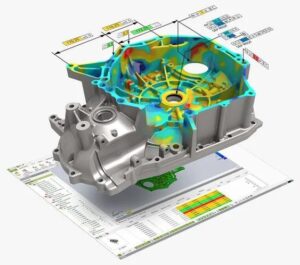
A mesh does not inherently identify functional datums, nominal dimensions, or required tolerances. These details can be essential for machining, assembly, and dimensional inspection.
Wear and deformation
A scanned part represents its physical condition at the time of measurement. Worn surfaces, warped plastic, and damaged features may differ from the original design.
Reverse engineering helps engineers determine which characteristics to preserve and which may need to be reconstructed from reference information or functional requirements.
Downstream manufacturing requirements
CNC machining and tooling may require clean geometry, defined features, suitable coordinate systems, and appropriate manufacturing documentation.
A dense mesh does not automatically provide these capabilities. However, some CAM systems can machine directly from mesh data, so CAD reconstruction is not mandatory for every application.
The objective is not simply to reproduce the surface, but to deliver geometry that meets the intended engineering requirements.
5. When Should You Choose Each Workflow?
Choose Scan-to-STL when you need:
- A physical replica or prototype through 3D printing.
- A digital reference for visualization or archiving.
- Mesh data for comparison against an existing CAD model.
- Geometry for a compatible mesh-based workflow.
Choose Reverse Engineering when you need:
- Replacement parts without original CAD files.
- Editable models for product redesign.
- Reconstructed geometry for molds, tooling, or CNC machining.
- Technical drawings, defined dimensions, or manufacturing documentation.
- CAD data for further engineering work involving CAD, CAE, or CAM.
The required level of reconstruction should be established before the project begins.
6. TAS’s Scan-to-CAD Engineering Workflow
At TAS, the workflow can extend beyond scanning to support downstream engineering requirements.
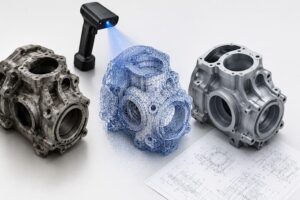
3D Scanning → Mesh Processing → Feature Recognition → CAD Reconstruction → Validation → Engineering Deliverables
- 3D Scanning: Capture the physical component’s geometry.
- Mesh Processing: Clean and align scan data while preserving relevant features.
- Feature Recognition: Identify functional surfaces, holes, and geometric relationships.
- CAD Reconstruction: Rebuild suitable surfaces and solid geometry.
- Validation: Compare the reconstructed model against scan data and agreed requirements.
- Engineering Deliverables: Provide the agreed mesh files, CAD models, drawings, or inspection data.
Where required, the reconstructed model can support further CAM programming and manufacturing preparation.
This approach aligns with TAS US’s engineering outsourcing capabilities across CAD, CAE, CAM, and automation.
7. Frequently Asked Questions
Can STL be used directly for CNC machining?
Yes, in compatible mesh-based workflows. However, editable CAD may be more suitable when the part requires feature modification, defined interfaces, or conventional engineering drawings.
Can STL be converted to STEP?
Yes, through suitable conversion or reconstruction workflows. However, converting a mesh does not automatically produce a clean, editable parametric model.
Does reverse engineering recover the original design exactly?
Not necessarily. Recovering nominal geometry may require original drawings, specifications, reference parts, and engineering judgment.
Conclusion
STL is useful for capturing and reproducing physical geometry, but manufacturing requirements may extend beyond surface representation.
Reverse engineering bridges that gap by reconstructing CAD geometry for design modification, dimensional control, and downstream engineering applications.
Need an STL file for 3D printing or a CAD model for manufacturing? Contact TAS US to discuss the appropriate 3D scanning and reverse engineering workflow for your project.
No responses yet